

Laptop backpacks are the unsung heroes of the digital age. They are specialized bags designed to carry and protect your loyal companion—your laptop—along with all your daily essentials.
In a world where our computers are with us for work, entertainment, and connection, choosing the right bag isn’t just about style; it’s a significant comfort and protection decision. A well-fitting laptop bag safeguards your device with padded sleeves, keeps you organized, and prevents you from hauling unnecessary weight or suffering from a sore back.
The wrong size, however, risks a constantly shifting laptop, strained seams, and poor ergonomics. A bag that’s too small may force you to jam your device in place, while an overly large one invites you to fill it with clutter.
This ultimate Laptop Backpack Size Guide will walk you through how to measure and evaluate laptop bag size on all fronts—the sleeve, the volume, and the fit—so you can find a bag that truly fits your life.
if you prefer backpacks that feel light to carry, take a look at our Best Lightweight Laptop Backpacks.
Why Size Matters: More Than Just Fitting Your Laptop
When you choose a laptop backpack, you’re balancing four critical factors:
- Comfort & Ergonomics: A correctly sized backpack distributes weight evenly across your back and hips. Padded shoulder straps and back panels prevent shoulder or back strain. Modern ergonomic design balances the load close to your center of gravity.
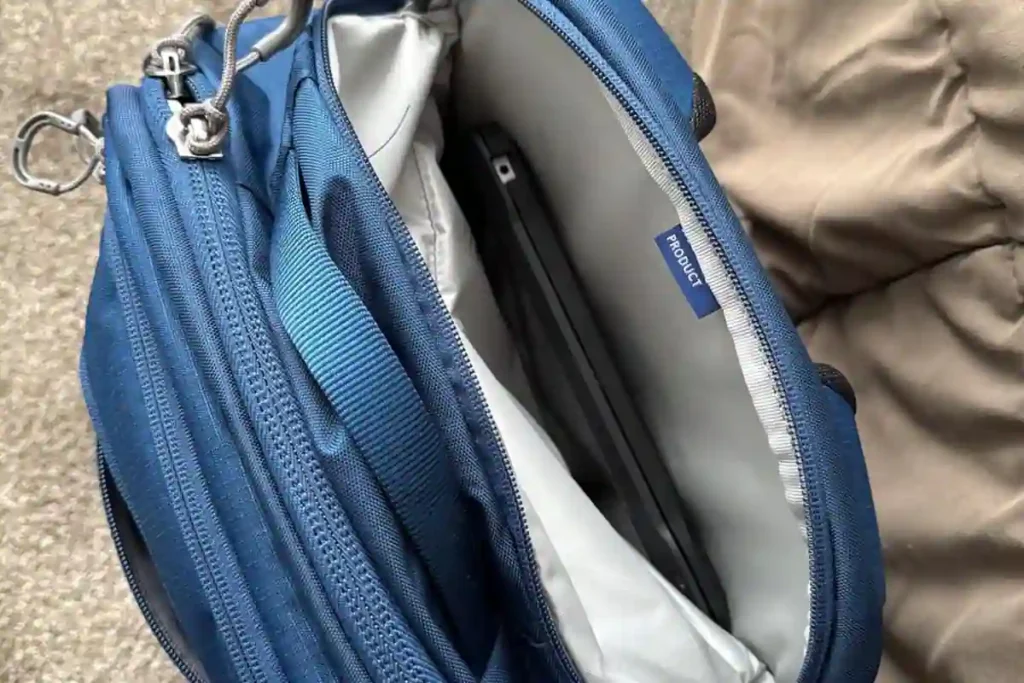
- Protection: The bag’s internal laptop sleeve must wrap snugly around your computer. Too much slack means the laptop can jostle and bang around; too tight means stress on the zippers and seams. The right fit keeps your device centered and guarded in the padded compartment.
- Capacity: Beyond the laptop, volume (measured in Liters) dictates what else you can carry. Smaller bags (10-15 L) suit minimal commuters, while larger packs ( 30-40+ L) fit multi-day travel gear.
- Portability & Compliance: For travelers, size can be the difference between strolling onto the plane or checking your bag. Airlines care about overall dimensions, and your backpack’s size can affect your entire travel plan.
If you’re looking only for a quick, no-nonsense breakdown of backpack sizing, you can check out our dedicated Backpack Size Guide for a deeper dive into the essentials.
Core Sizing Concept: The Laptop Sleeve
This is the most critical measurement. You must ensure your laptop fits the internal, padded compartment perfectly.
Understanding Laptop Sleeve Sizing
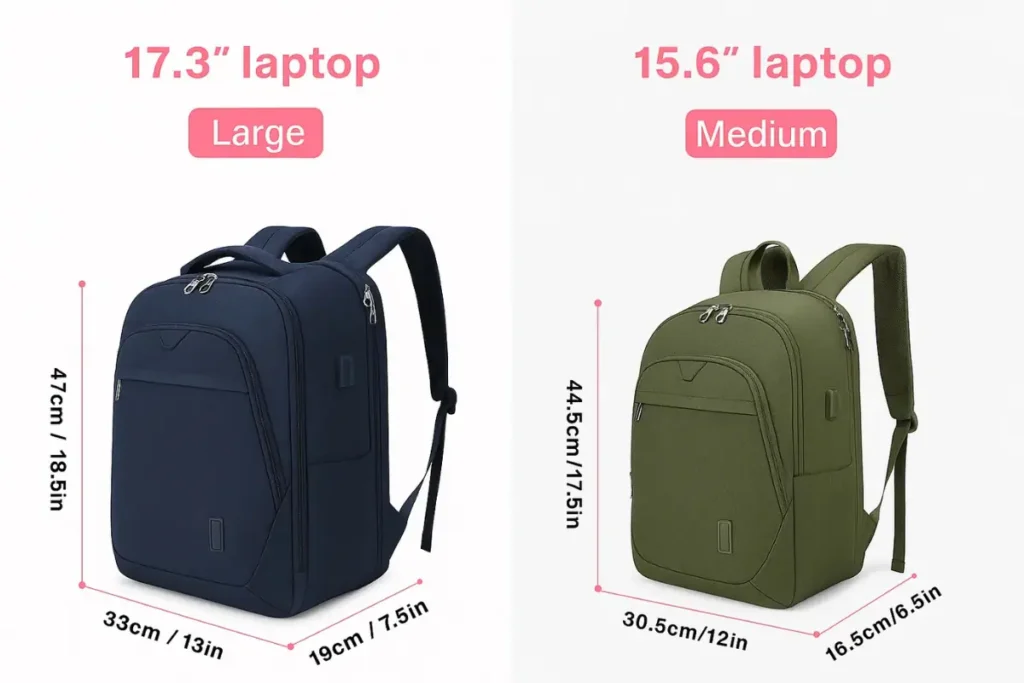
When a bag is advertised as a “15-inch laptop backpack,” that measurement refers almost exclusively to the size of the built-in laptop compartment, not the total bag volume. In other words, you must measure your laptop first.
Laptop sizes (13″, 15.6″, 17″, etc.) are industry-standard shorthand for the screen’s diagonal length.
The Golden Rule: Measure the Screen (Diagonally)
To find your best laptop backpack size always measure diagonally from corner to corner of the actual display (excluding the outer plastic frame or bezel).
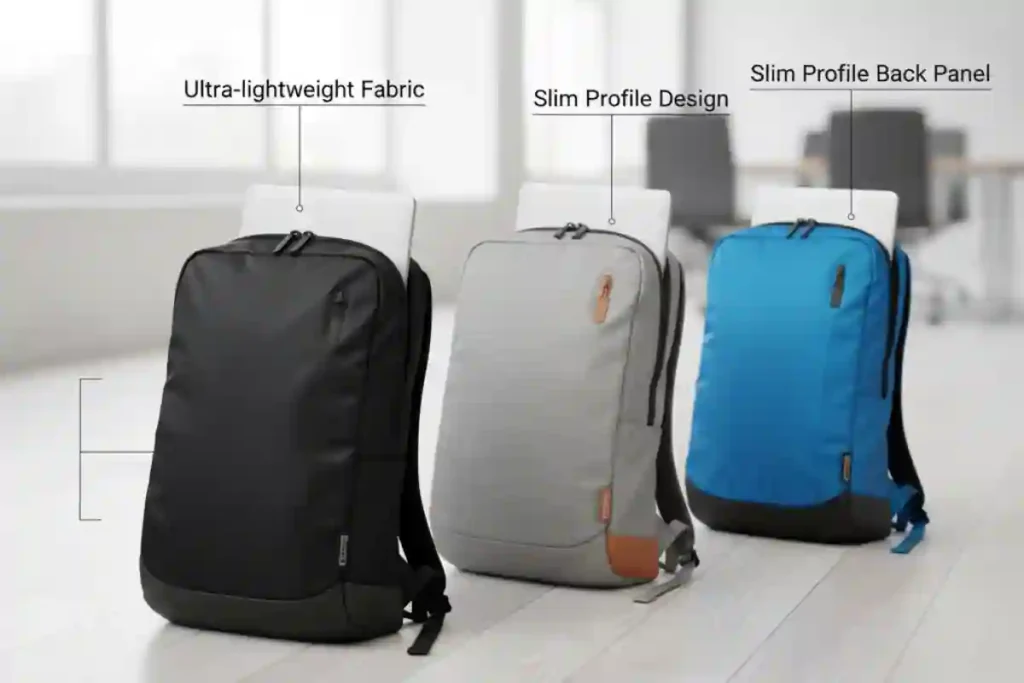
- If your measurement shows 15.6″, you should look for a bag labeled 15″-15.6″.
- If you measure 17″, step up to a 17″+ backpack.
If you’re hauling a 17-inch laptop around, don’t risk it with the wrong bag. Check out our 7 Best 17-Inch Laptop Backpacks of 2026—an all-in-one guide built for commuters, students, and gamers who need serious protection.
The Critical Difference: Screen Size vs. Actual Device Dimensions
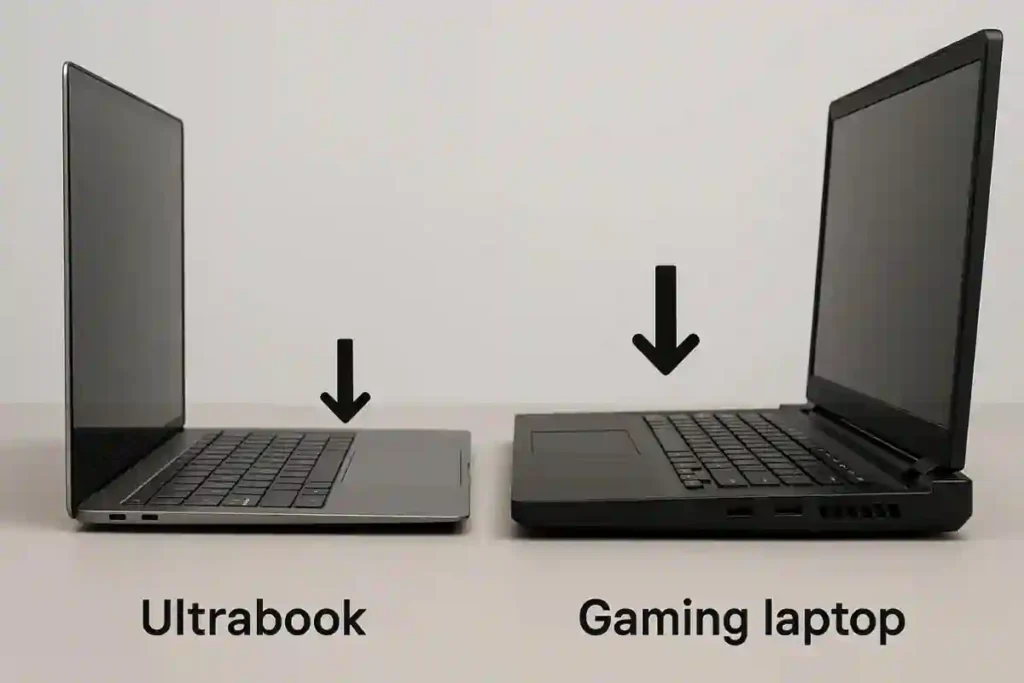
Here’s the catch: Two laptops, both labeled “15-inch,” can differ significantly in their physical Width, depth, and height.
- Bezels & Thickness: Modern laptops often have ultra-thin bezels, making the overall machine smaller than older models. Conversely, gaming laptops usually pack bulky cooling hardware, making them much thicker and deeper than their screen size suggests.
- The Takeaway: After measuring the screen, you must also look up your laptop’s full Width, depth, and height from the manufacturer. Make sure the bag’s laptop compartment is listed as large enough in all three dimensions, not just the diagonal length.
Laptop Backpack Size Chart: Screen vs. Bag Volume
Below is a general guideline mapping screen diagonals to the typical size of the backpack required to hold that device comfortably, along with other essentials.
| Screen Size (inches) | Typical Backpack Capacity | What It Accommodates |
| 11″–13″ | 10-15 L (Compact Daypack) | Small laptop/tablet, wallet, keys, minimal essentials. |
| 14″–16″ | 20-30 L (Medium Everyday) | 15″ laptop, notebooks, a jacket, chargers, and accessories. |
| 17″–18″ | 30-45 L (Large/Travel Pack) | 17″ laptop, plus clothes and gear for travel or bulky accessories. |
Backpack Volume & Capacity
Once the laptop fits, the second question is: how much other stuff do you need to carry?
Decoding Backpack Capacity: What Do Litres Mean?
Backpack volume is measured in Liters (L)—this is essentially the total space inside the bag’s main compartments.
- A 10-15 L bag is tiny, suitable for a tablet and a few small items.
- A 20-30 L bag is the comfortable, “Goldilocks” size for most students and commuters.
- A 30-40 L bag or more is considered a large pack, primarily used for multi-day travel.
Choosing Capacity Based on Your Use Case
Your lifestyle dictates how much you need to carry beyond the laptop.
| Use Case | Recommended Volume (Litres) | Primary Gear Beyond Laptop | Key Consideration |
| Daily Commute (Work/School) | 15 – 25 L | Notebook, lunch, water bottle, charger. | Focus on a slim profile and internal organization (e.g., pen loops, quick-access pockets). |
| Business/Weekend Travel (1–3 days) | 25 – 35 L | 1-2 changes of clothes, toiletries, camera or tablet. | These often double as personal carry-on items. Look for luggage pass-through sleeves. |
| Digital Nomad/Longer Trip | 35 – 45 L | Multiple outfits, extra tech gear, shoes. | Max capacity while remaining strictly airline carry-on compliant (check dimensions carefully). |
| Photography | +5 – 10 L extra | Camera body, multiple lenses, protective inserts. | Ensure the pack has enough depth to accommodate padded inserts and cubes without crowding the laptop. |
| Gaming Laptops | 30 – 45 L (for 17″-18″ models) | Heavy power brick, cooling pads, large peripherals. | Look for extra depth and sturdy, reinforced straps and handles due to the increased weight. |
Ergonomics & Fit: Matching the Bag to Your Body
This is often the most overlooked factor, but it’s essential for preventing chronic back and shoulder pain.
Backpack Fit: Matching the Bag to Your Torso
No backpack truly fits everyone. For packs over 30 L or those carrying hefty loads, the “height” of the pack on your back is determined by your torso length, not your overall height.
- Why it Matters: If a pack is too big for your Torso, the hip belt (if present) will sit on your thighs instead of your hips, which means your shoulders—not your powerful leg muscles—will carry the entire load.
Key Body Measurement: Torso Length
To measure your Torso at home:
- Stand straight and have a friend find the prominent bone at the base of your neck (the C7 vertebra).
- Have them measure down your back to the point that aligns with the top of your hip bones (iliac crest).
This length is your torso size. Many pack makers specify which Torso length their sizes (Small/Medium/Large) fit.
Rough Torso Guidelines:
- Small: 16″-18″ ( 40-45 cm)
- Medium: 18″-20″ (45-51 cm)
- Large: 20″+ (51+cm)
If you have a shorter frame, check our Best Backpacks for Petite Women for packs that scale down without sacrificing features.
The Role of Straps and Belts
| Component | Function | Proper Fit |
| Shoulder Straps | Carry the weight when the bag is light or empty. | Should curve comfortably over the shoulder without digging in. |
| Sternum (Chest) Strap | Stabilizes the load and prevents the shoulder straps from slipping. | Should sit about 1″ below your collarbones, tightened just enough to stabilize the load. |
| Hip Belt | Critical: Transfers up to 70% of the weight to your hips (for large bags). | Must wrap firmly around the top of your hip bones (iliac crest), not your waist. |
Special Considerations & Features
Sizing for Travel: Mastering Airline Carry-On Rules
Remember, airlines check linear dimensions (Height x Width x Depth), not the volume in Liters.
- The Standard Limit: The typical North American carry-on limit is about 22″ x 14″ x 9″ (56 x 36 x 23 cm).
- The Depth Problem: The depth (or thickness) of your pack is the dimension most likely to exceed limits, especially when you overstuff it.
Measuring the Bag: The True Dimensions
To avoid surprises at the gate:
- Fully pack your bag as you would for travel.
- Lay it flat and measure its maximum length, Width, and depth.
- Always account for bulging pockets or any expansion panels.
For peace of mind, many travelers stick to a 40-45 L pack that is specifically marketed as carry-on compliant, leaving little room for error.
Sizing for Specific Gear
- Gaming Laptops: As mentioned, 17″-18″ gaming rigs are often 1″ – 1.5″ thick. If your computer is in this class, you must choose a backpack designed specifically for gaming to ensure it has the necessary sleeve size and depth.
- Photography Gear: Camera gear uses padded inserts or cubes, which take up substantial volume and depth. Plan to opt for a pack that is one size larger than you initially thought, simply to make room for the added protection of the photography inserts alongside your laptop.
Our Best 17-Inch Laptop Backpacks guide highlights top-rated packs built for oversized laptops—start there to quickly find models that can handle heavy rigs without breaking a sweat.
Your Perfect Fit Awaits
The search for the perfect laptop backpack shouldn’t be stressful. It simply requires balancing three measurements:
- Laptop Sleeve Size: Must match or slightly exceed your laptop’s diagonal screen measure.
- Volume (Litres): Must suit your gear list and use case without being unnecessarily bulky.
- Torso Fit: The pack’s harness must align with your back length for comfortable, ergonomic carrying.
Use this guide to double-check every dimension before clicking buy. Measure your laptop, measure your body, and compare those to the backpack’s specs.
Ready to find specific models that fit your needs? Browse our curated lists:
- Best 17-Inch Laptop Backpacks.
- Best Hard-Shell Backpacks for Laptops and Riders
- Best Business Laptop Backpacks
- Best Lightweight Laptop Backpacks.
FAQ’s Laptop Backpack Size Guide
How to Measure Your Laptop’s Size
Measuring your laptop is way easier than it sounds. When people talk about a “14-inch” or “15.6-inch” laptop, they’re actually referring to the diagonal length of the screen—not the height or width of the entire device.
Here’s the quick way to get it right:
Open your laptop so the screen is fully visible.
Place a measuring tape at the top-left inner corner of the display (not the bezel).
Stretch it diagonally to the bottom-right inner corner of the screen.
The number you get — 13″, 15.6″, 17″, etc. — is your official laptop “size.”
But don’t stop there! Two laptops with the same diagonal size can still have different widths, depths, and thicknesses. Ultra-thin ultrabooks, chunky gaming rigs… they all vary.
So after you know the diagonal size, take a moment to check your laptop’s full dimensions from the manufacturer. This ensures your new backpack or sleeve isn’t too tight, too loose, or struggling to zip up.
What Is a “Suspended Sleeve” and Why is it Essential for Heavy Laptops?
A suspended sleeve is a special laptop compartment designed so the bottom of your laptop never actually touches the bottom of the backpack. Instead of sitting directly on the base, the laptop “hangs” slightly above it—like it’s floating in a little hammock of padding.
Why does this matter?
Because the bottom of a backpack is the danger zone. That’s where all the impact happens when you set your bag down a bit too fast, drop it on the floor, or accidentally bump it against something.
For regular lightweight laptops, this extra cushioning is a nice-to-have.
For heavier laptops—think gaming machines or big 17-inch workstations—it’s essential. These laptops carry more mass, which means any sudden impact hits them harder. A suspended sleeve absorbs that shock instead of letting it travel straight into the laptop’s corners or hard drive.
In short:
A suspended sleeve gives your laptop a built-in shock absorber, keeps it from slamming against the bottom of your bag, and dramatically reduces the risk of damage—especially for heavier, bulkier machines. It’s one of those features you’ll be grateful for the first time your bag hits the ground a bit harder than expected.