Most people still run the same airport routine they had five years ago. That’s usually fine — until it isn’t, and you’re the one holding up the line.
TSA rules 2026 What’s changed at airport security checkpoints this year?
- Tech – CT scanners let you leave electronics in your bag — but only in lanes that have them
- Enforcement– Tablets and e-readers are more consistently being pulled out for separate screening
- Practice- Liquids bags are more often required to sit alone in their own bin
Heads up
TSA does not charge fees at security. If you read something about a “$45 ConfirmID fee” — that’s false. Forgotten ID means extra screening, not a bill. Always free.
Here’s the thing — TSA hasn’t rewritten the rulebook. What’s actually happening is a mix of new scanner technology rolling out unevenly across airports, and officers enforcing existing rules more strictly than they used to. Your experience will vary by lane, by airport, even by time of day. Keeping that in mind is half the battle.
CT scanner lanes: you can leave your laptop in your bag
This one’s genuinely good news. Airports have been installing CT scanners — the same kind of 3D imaging tech used in hospitals — at security checkpoints. In those lanes, you don’t need to pull out your laptop or large electronics at all. The scanner gives officers a full 360-degree view of your bag contents without anything being removed.
The catch is that not every lane has one yet. You might walk into a checkpoint where the left lane has a CT scanner and the right lane still uses the old X-ray belt.
In the old lane, the rules haven’t changed — laptop out, flat in a bin. So check before you start digging through your bag.
How to tell
CT scanners look bigger and more enclosed than the standard flat belt machines. Not sure? Just ask the officer at the front of your lane. They’ll tell you in two seconds.
Worth knowing -Your home airport and your destination airport might operate completely differently. Don’t assume.
Tablets, Kindles, and gaming devices need their own bin now
In lanes without CT scanners, officers are more consistently asking you to pull out anything bigger than a phone and put it flat in a bin by itself. That includes your iPad, Kindle, Kobo, Nintendo Switch — anything with a screen that isn’t a smartphone.
This isn’t technically new, but the enforcement is noticeably tighter this year. The people who get flagged and slowed down are almost always the ones who didn’t know this or forgot their e-reader was buried at the bottom of the bag. Pull those out while you’re still in line, not when you’re at the belt.
Simple rule
If it has a screen and it’s bigger than your phone, it probably needs its own bin in a standard lane. When in doubt, pull it out — there’s no penalty for being overprepared.
Your liquids bag: put it in a bin on its own
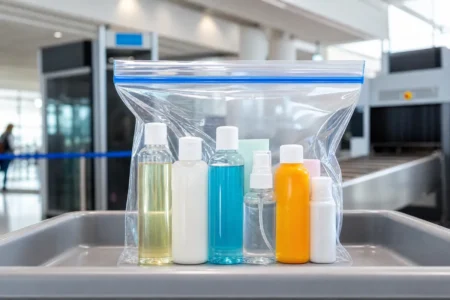
The 3-1-1 rule is the same as always — quart-sized clear bag, 3.4oz containers, one bag per person. What’s changed is that officers are more often asking you to place that bag in its own bin, nothing else in it. Not under your shoes, not inside your backpack, not under a jacket.
It’s inconsistently enforced, honestly. Some lanes are strict about it, some aren’t. But if you just make it a habit — liquids bag gets its own bin, every time — you’ll never get held up over it.
Easy fix
Keep your liquids bag in the outermost pocket of your carry-on. It’s the first thing you grab and you won’t be fishing around for it at the belt.
Real ID: the reminders are getting louder
You’re going to notice more signs and more agents mentioning Real ID at checkpoints this spring. The final enforcement deadline has been pushed back a few times over the years, but the window really is closing.
If your license doesn’t have a small gold or black star in the top corner, it’s worth just getting it sorted before summer — DMV appointments fill up fast when everyone has the same idea.
For now, if you show up without a compliant ID, you’ll go through extra identity verification. It’s free, but it takes time and you might miss your flight if the line is long.
- Extra identity checks
- Additional screening possible
- No fee, but takes time
- Risk of missing your flight
- U.S. passport or passport card
- Military ID
- DHS trusted traveler card
- Permanent resident card
Before you get to the checkpoint — run through this
- Look at the scanner when you get to your lane — CT or standard X-ray?
- CT lane: leave everything in your bag
- Standard lane: laptop out flat, tablet and e-reader out separately
- Liquids bag gets its own bin — nothing else in it
- Pull tablets and e-readers out while you’re in line, not at the belt
- Real ID or a passport — schedule the DMV now if you haven’t
- Forgot your ID? Extra screening, not a fee — TSA doesn’t charge for this
Got a specific trip coming up? I can put together a checkpoint prep list for your exact airports.
Also See:-
- Budget Airlines Carry-On Rules (Spirit, Frontier, Ryanair) – 2026 Complete Guide
- US Domestic Carry-On Rules (2026): A Complete, Airline-by-Airline Guide
- TSA PreCheck Status 2026: Is It Closed During the Government Shutdown?
- USA Carry-On Rules for 2026: TSA Size, Liquids & Battery Rules Explained
- Flying Without a REAL ID in 2026: TSA $45 Confirm.ID Fee, Rules & Accepted IDs
Frequently Asked Questions
Do I still need to take my laptop out at TSA in 2026?
It depends on the lane. In CT scanner lanes, laptops can stay in your bag. In standard X-ray lanes, they must be removed and screened separately.
Do tablets need to be removed at airport security?
Yes, in most standard lanes. Devices larger than a phone—like tablets and e-readers—often need to be placed in a separate bin.
Has the TSA liquids rule changed in 2026?
No, the 3-1-1 liquids rule is the same. However, enforcement is stricter, and liquids bags are often screened separately.
What happens if I don’t have a REAL ID?
You can still travel using alternative identification like a passport, but REAL ID compliance is becoming increasingly important.